



Introduction: Why NAP Auditing Matters More Than You Think
Your business name, address, and phone number are worth their weight in local SEO gold. When these details—called your NAP—are inconsistent across the internet, Google gets confused. Confused algorithms don’t rank businesses well.
Most small business owners think citation services are the only solution. They’re not. You have the power.
This guide teaches you exactly how to audit your NAP without paying monthly subscription fees. You’ll learn step-by-step tactics. You’ll understand why accuracy matters deeply. And you’ll take back control of your local search visibility. Auditing your business NAP does not have to be a scary thing or an overly complicated one, it does however require an investment of time.
What Is NAP and Why It Matters for Local SEO
Understanding NAP: The Foundation of Local Search
NAP stands for Name, Address, and Phone. It’s the critical information Google uses to identify your business across the entire internet. Think of it as your business’s digital fingerprint.
When your NAP matches everywhere online, Google trusts you more. When it’s scattered and inconsistent, Google questions your legitimacy. Inconsistency directly hurts your local search rankings.
How NAP Impacts Your Google Business Profile
Your Google Business Profile is ground zero for local SEO. It shows up in Google Maps, search results, and Google’s Knowledge Panel. When your NAP is accurate here—and matches everywhere else—Google rewards you with better visibility.
Inconsistent NAP data tells Google something is wrong. It may push your business down in local pack rankings. It may make your profile appear less trustworthy to customers searching for you.
The Citation Connection: Where Your NAP Lives Online
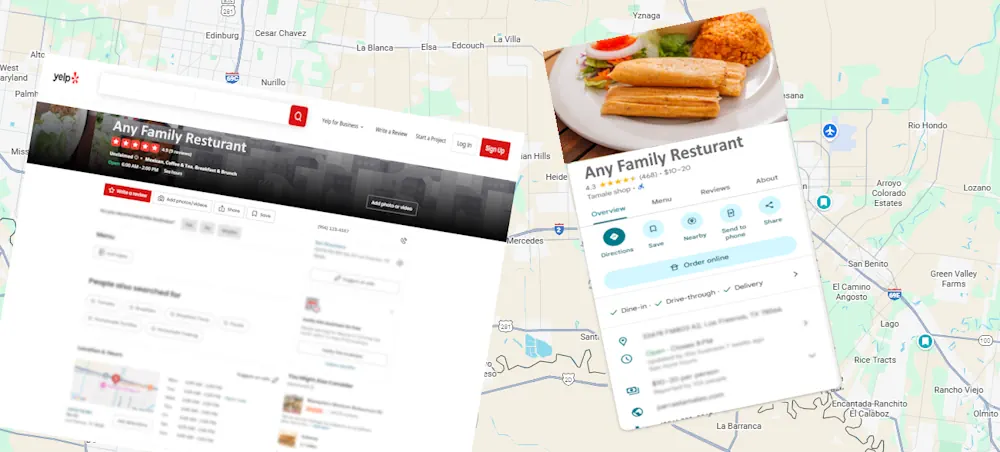
A citation is any online mention of your business’s NAP. Citations live in hundreds of places: directories, review sites, social media, partner websites, and more. Each citation should display your NAP exactly the same way.
Inconsistent NAP across citations is the biggest enemy of local SEO success. This is why auditing matters so much.
The Cost of Inconsistent NAP Data: Real-World Scenarios
Scenario 1: The Address Variation Problem
Meet Sarah, who owns a dental practice in Austin, Texas.
Her Google Business Profile lists: “1234 Oak Street, Austin, TX 78701”
But her Yelp listing says: “1234 Oak St, Austin, Texas 78701”
And her Facebook page shows: “1234 Oak Street, Austin, Texas 78701”
Google notices these variations. Even small differences like “Street” vs. “St” or “TX” vs. “Texas” create confusion. Google may think these are three different businesses. Your rankings suffer. Phone calls get lost.
Scenario 2: The Phone Number Disaster
James runs an HVAC company in Brownsville. He’s had the same business phone for 10 years. But he never updated old directory listings when he added a new local number for better call tracking.
Now his citations show two different phone numbers. Customers call both. Google can’t figure out which is correct. His local visibility drops. Worse, he’s missing customer calls on one number while they reach voicemail.
Scenario 3: The Silent Reputation Hit
Maria manages three hair salons across the RGV. She listed them on Yelp three years ago but never updated her information. Her street address is correct but the other details are outdated.
She doesn’t realize new citations created automatically by data aggregators are pulling from outdated sources. Her citations show contradictory information. New customers see conflicting hours and phone numbers. They choose competitors instead.
This then, explains the reason for needing to audit and maintain this information.
How to Build Your NAP Search Query: The Essential First Step
Section 1 Build your Queries
So our first step is to decide exactly how your business information is to be displayed throughout the Internet.
So before jumping into auditing, establish the single, exact format for your Business Name, Address, and Phone Number that every citation must match. This is your “Golden Reference.”
| Data Point | Golden Reference |
| Business Name | [Exact legal name, e.g., Sarah’s Dental Care, PLLC] |
| Address | [Full address, e.g., 1234 Oak Street, Austin, Texas 78701] |
| Phone | [Consistent format, e.g., (512) 555-0123] |
Example:
Business Name: Sarah’s Dental Care, PLLC
Address: 1234 Oak Street, Austin, Texas 78701
Phone: (512) 555-0123
Step 2: Create Search Query Variations
Google doesn’t search the internet like you do. You need multiple search query variations to find all your citations. Create searches using:
Query Format 1: “Business Name” “Address” “Phone”
Example: “Sarah’s Dental Care, PLLC” “1234 Oak Street, Austin, Texas 78701” “(512) 555-0123”
Query Format 2: “Business Name” “City” “Phone”
Example: “Sarah’s Dental Care” Austin “(512) 555-0123”
Query Format 3: Business Name only
Example: “Sarah’s Dental Care”
Query Format 4: Business Name + city + state
Example: “Sarah’s Dental Care” Austin Texas
Run each search in Google. Write down every result. You’re building your citation map.
Step 3: Expand Your Search with Address Variations
People list addresses differently online. Run searches with these variations:
- Full address: 1234 Oak Street, Austin, Texas 78701
- Abbreviated street: 1234 Oak St, Austin, TX 78701
- No ZIP: 1234 Oak Street, Austin, Texas
- Just number and street: 1234 Oak Street
Each variation might reveal new citations you didn’t find before.
Step 4: Document Everything in a Spreadsheet
Create a spreadsheet with columns for:
- Citation Source (Name of site)
- Current Business Name Listed
- Current Address Listed
- Current Phone Listed
- Match Status (Yes/No)
- Notes (What needs fixing)
Every citation you find goes in this spreadsheet. This becomes your audit tool.
Step 1 The Core Auditing Process
| Step | Action | What to Check & Fix |
| 1. Access | Log in or search for your business listing on the specific source. | Is your listing claimed? (If not, claim it immediately). |
| 2. Compare | Review the Name, Address, and Phone (NAP) listed on the source. | Does the NAP exactly match your Golden Reference? |
| 3. Verify | Check secondary information on the listing. | Are Hours of Operation, Website Link, and Category accurate? |
| 4. Document | Record the source name, the information found, and the Match Status (Yes/No) in your audit spreadsheet. | Note any specific variation (e.g., “Street” vs. “St”). |
| 5. Action | Correct any inconsistency immediately using the platform’s editor. | Primary Goal: Make it an exact match to your Golden Reference. |
The process for auditing any business listing is the same. Follow these steps for every source listed below.
Tier 1: Google Properties & Your Website (Fix Immediately)
- Google Business Profile: This is the most critical source. Ensure everything matches.
- Google Maps Verification: Confirm your profile information is pulling correctly into Maps.
- Your Website (Homepage Footer & Contact Page): Your website is the ultimate authority. NAP here must be perfect and use Schema Markup correctly (see Section 3).
Tier 2: Major Directories (Fix Within 1 Week)
- Yelp Business Listing
- Apple Maps & Siri
- Facebook Business Page
Tier 3: Secondary Directories & Review Sites (Fix Within 2 Weeks)
- BBB (Better Business Bureau) Listing
- Chamber of Commerce & Local Listings
- Industry-Specific Directories (e.g., ZocDoc, HomeAdvisor)
- Instagram & LinkedIn Profiles
- Review Sites (Google Reviews, Yelp Reviews, etc.)
Tier 4: Data Aggregators (Ongoing)
- Whitepages
- Data.com / ZoomInfo
- Note: Correcting these sources helps prevent future inconsistencies from spreading.
Section 2: Your Website Audit (The Authority Center)
Your website is your NAP authority center. This is where all your citations should point back to.
2.1 Homepage Footer Audit
- Business name displayed
- Complete address shown
- Phone number correct
- Hours of operation accurate
Action: If footer NAP doesn’t match your golden reference, update it immediately.
2.2 Contact Page Audit
Action: Make homepage and contact page NAP identical. No variations.
2.3 Location Pages Audit (Multi-Location Businesses)
What to check:
- Each location has a dedicated page
- Each page shows correct NAP for that location
- No mixing of location information
- Phone numbers are location-specific
Action: Create dedicated location pages if you don’t have them. Make NAP completely consistent within each page.
Section 3: Schema Markup Audit (Technical Layer)
Schema markup tells search engines your business information. Incorrect schema spreads incorrect information.
3.1 LocalBusiness Schema Verification
What to check:
- Business name in schema matches your golden reference
- Address in schema is complete and correct
- Phone number in schema matches
- URL in schema is correct
How to audit:
- Go to your homepage
- Right-click and select “View Page Source”
- Search for “LocalBusiness” or “Organization”
- Look for name, address, telephone fields
- Verify against your golden reference
Action: If schema is incorrect, contact your web developer to fix it. Schema errors spread to Google and other search engines.
Section 4: Creating Your NAP Audit Report
4.1 Consolidate Your Findings
Use your spreadsheet to organize findings by:
- Consistent: Listed correctly everywhere
- Minor Variations: Small differences (abbreviations, format)
- Major Issues: Completely different information
- Missing Listings: Places you should be listed but aren’t
4.2 Prioritize Fixes by Impact
Tier 1 (Fix Immediately):
- Google Business Profile
- Google Maps
- Your website
Tier 2 (Fix Within 1 Week):
- Yelp
- Apple Maps
- Major local directories
Tier 3 (Fix Within 2 Weeks):
- Industry-specific directories
- Social media profiles
- BBB listing
Tier 4 (Ongoing):
- Aggregator databases
- Small local directories
4.3 Track Your Progress
In your spreadsheet, add a column for “Date Updated.” As you fix each citation, record the date. This shows you’re making progress and helps you remember which ones you’ve already handled.
Common NAP Errors and How to Fix Them
Error Type 1: Address Abbreviations
Problem: Your Google Business Profile shows “1234 Oak Street” but Yelp shows “1234 Oak St”
Impact: Google sees these as potentially different businesses.
Fix: Choose one format and stick with it everywhere. Use full words: “Street,” “Avenue,” “Road,” not “St,” “Ave,” “Rd.”
Error Type 2: State Format Variations
Problem: Google shows “Texas” but Yelp shows “TX”
Impact: Google’s algorithms notice inconsistency. Ranking signal weakens.
Fix: Use one format everywhere. Most professionals use two-letter state codes (TX) or full state names (Texas). Pick one and be consistent.
Error Type 3: Suite/Apartment Numbers
Problem: You’re in Suite 200. Some listings show “1234 Oak Street, Suite 200” while others show “1234 Oak Street #200”
Impact: Minor but cumulative inconsistency.
Fix: Use same formatting everywhere. Include suite number exactly the same way in every citation.
Error Type 4: Phone Number Formatting
Problem: Google shows “(512) 555-0123” but Yelp shows “512-555-0123” or “5125550123”
Impact: May hurt trust signals slightly.
Fix: Use consistent formatting everywhere. Standard is (Area Code) Number or Area Code-Number. Pick one.
Error Type 5: Business Name Variations
Problem: Your legal name is “Sarah’s Dental Care, PLLC” but you list it as “Sarah’s Dental Care” on some sites.
Impact: Google might think these are different businesses.
Fix: Use your exact legal business name everywhere. If you go by a nickname, use it only in quotes or as secondary text.
Why Citation Services Can’t Replace Your Audit
Many business owners consider citation services. These services charge monthly fees to manage your citations. But here’s what they don’t tell you: they can’t replace your personal audit.
The Citation Service Trap
Citation services promise to update your information everywhere. Sounds great. But here’s the reality:
They fix only their network. Citation services partner with specific directories. They can’t fix listings on directories outside their network. You could still have incorrect information on dozens of sites they don’t reach.
You pay forever. Once you sign up, you’re committed to monthly fees. If you find errors, you still have to wait for their team to fix them. It costs more to expedite.
They don’t verify accuracy. Services update information but rarely verify it’s actually correct on each site. They submit updates and move on. Some updates fail silently.
Personal responsibility is the answer. This audit gives you complete visibility. You see every citation. You know exactly what information is wrong. You control the fixes yourself.
FAQ: NAP Audit Questions Answered
Q: How many citations should I have?
A: There’s no magic number. Bigger businesses in competitive markets should have 50+ citations. Small businesses in small towns might need only 15-20. Focus on quality and consistency, not quantity.
Q: How long does it take to fix all my NAP errors?
A: It depends on how many errors you have. Most small businesses can fix Tier 1 items (Google Business Profile, website, Yelp) in 1-2 hours. Tier 2 and 3 items take additional time. Plan for one thorough audit session of 3-4 hours.
Q: Will fixing NAP errors improve my rankings immediately?
A: Not immediately, but yes eventually. Google re-indexes your citations over time. Most businesses see ranking improvements within 4-8 weeks after fixing major NAP inconsistencies. Patience is important.
Q: What if I moved my business to a new address?
A: Update your Google Business Profile first. Then systematically update every citation. Keep old address citations only if you still serve that area. Contact citation aggregators if old addresses persist.
Q: Can I use a P.O. Box instead of a street address?
A: Google requires a street address for local businesses. P.O. Boxes don’t work for Google Business Profile. Service-based businesses can use their home address or a virtual office address.
Q: Should I list multiple phone numbers?
A: No. Use one main phone number everywhere. If you track calls with a separate number, keep it off public citations. Inconsistent phone numbers confuse Google.
Q: How do I handle being listed in multiple cities?
A: If you serve multiple cities, create separate Google Business Profiles for each if you have physical locations. Use service area features instead of separate profiles. Never use duplicate citations in different cities.
Q: What if I find incorrect information I didn’t create?
A: Contact the directory and request a correction. Most directories have a “Claim Business” or “Edit” option. If the directory won’t correct it, contact data aggregators. This takes patience but it’s worth it.
Q: Do local citations affect my national search ranking?
A: Not really. Local citations primarily affect local search results, Google Maps, and the Knowledge Panel. They have minimal impact on national/organic search rankings.
Q: Is it worse to have inconsistent NAP or no citations at all?
A: Inconsistent NAP is worse. It confuses Google and signals mistrust. Better to have zero citations than many inconsistent ones. Focus on quality and consistency.
Q: How often should I re-audit my citations?
A: Run a quick monthly check on Google Business Profile and major platforms. Do a full audit quarterly. Annual deep dives catch things monthly checks miss.
Q: What if my business name changed but I kept the same address and phone?
A: Update Google Business Profile with new name first. Then update all citations. You might need to request old listings be removed or marked as duplicates. Contact data aggregators about the name change.
Q: Can I use a virtual address or co-working space?
A: It depends on your business type. Service-based businesses can. Retail or medical practices need real physical locations. Google will verify if something looks suspicious. Use your actual business location.
Q: What’s the relationship between NAP consistency and review generation?
A: Consistent NAP makes it easier for customers to find and review you. Inconsistent information makes review collection harder. Cleaner NAP data = more reviews over time.
Taking Action: Your Next Steps
You now understand NAP auditing better than most business owners. Understanding isn’t enough. Action matters.
Week 1 Action:
- Write down your golden reference NAP in exactly the format you want everywhere
- Create your audit spreadsheet
- Run your NAP search queries
- Document all findings
- Check your Google Business Profile for accuracy
Week 2 Action:
- Update Google Business Profile if needed
- Update your website (homepage and contact page)
- Fix Yelp listing
- Update Apple Maps or request correction
- Update Facebook Business Page
Week 3+ Action:
- Systematically update remaining Tier 2 and 3 citations
- Contact data aggregators if needed
- Verify all fixes took effect
- Set monthly maintenance reminders
Don’t wait. Inconsistent NAP is costing you right now. Every day it exists, Google is slightly confused about your business. Every week it persists, potential customers might be contacting the wrong phone number or going to the wrong address. It does take time and it does require a lot of repetitive motions but auditing your business’s NAP one of the details that put you ahead of all the others who aren’t doing the work.
Ready to Take Control? Let’s Get Started
You’ve learned the complete process for auditing your business’s NAP. You understand why consistency matters. You have the checklist. You know the common mistakes.
Now it’s time to act.
Don’t rely on expensive monthly citation services. Take control of your local search presence yourself. This is your business. Your reputation. Your success.
Our team understands the challenges of local SEO without expensive agency fees. At M Sutton Services we help small and medium business owners like you audit citations, improve Google Business Profiles, and dominate local search rankings.
However, it does take time and it does require repetitive effort and a bit of strategy how important it is and we know sometimes our fellow business owners need help.
Whether you need help auditing your business’s NAP, guidance implementing this checklist or ongoing support improving your local SEO, we’re here to help.
Your competition isn’t resting. Neither should your local search strategy. Reach out today.
[ez-toc-widget-sticky]